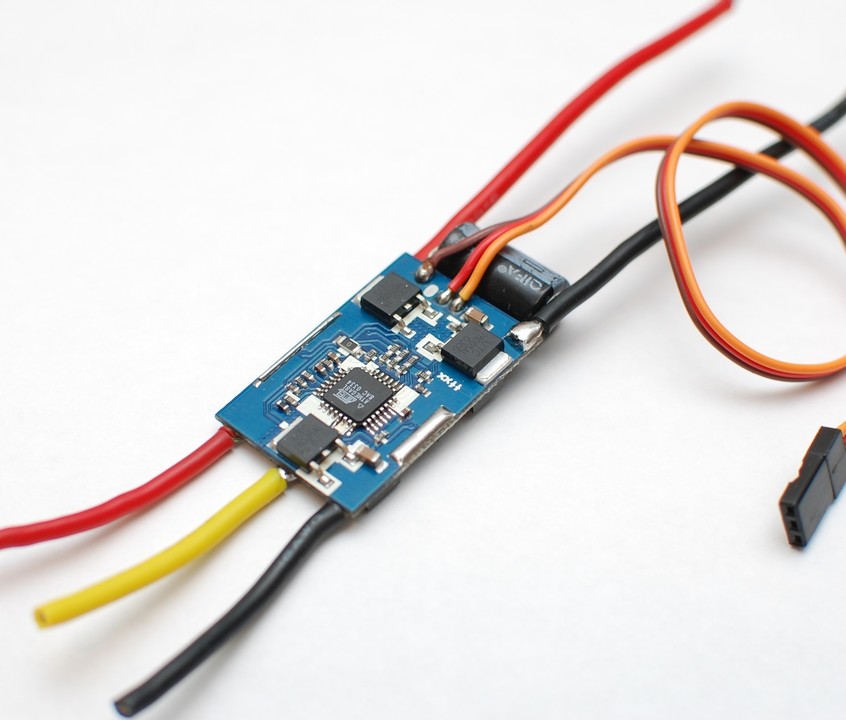
Hopefully I can give people a few pointers on the use of ESC (electronic speed controllers) to serve as a simple FAQ having just researched this a bit for a personal project. This is proving to be one of my most popular articles, please help make it even more useful by contributing your own insights and tips in the comments, and by sharing or liking.
Here's some example Arduino code for calibrating an ESC: http://robots.dacloughb.com/project-2/esc-calibration-programming/
- ESCs are designed to work from a radio frequency receiver module. These modules output a standard servo signal as used to drive "hobby servos". This means an ESC can be driven by a standard servo library. For arduino there is the built in Servo library which is simplest. However like me you may find the disabling of PWM on various outputs a problem in which case the Software Servo library works well and is similar.
- Speed controllers make audible tones by using the motor as a speaker so you must connect a motor to get feedback on programming.
- Almost all speed controllers follow the convention of entering calibration mode when powered up while throttle is at maximum. After an audible indication the throttle is set to minimum to set the full range.
- If your controller says it's 8 kHz or 16 kHz it is referring to the frequency of the PWM *DRIVING THE MOTORS*, not the signal from the receiver or arduino - you can ignore this.
- Standard RC controllers operate at 50Hz (20ms, 20 milliseconds, or 0.02s) between pulses and pulses in the range 1000–2000 µs (microseconds, 1–2 ms). As such most receivers use 1100–1900 µs as the programmed throttle range. The Arduino Servo class defaults to 50Hz already so you shouldn't have to worry about the frequency - just program the pulse width using writeMicroseconds.
- Read the code linked above carefully, look at the Servo guide on the Arduino website ( https://docs.arduino.cc/libraries/servo/ ), and understand the difference between Servo.write() and Servo.writeMicroseconds().
- If you can't figure out programming your ESC from the code linked above, the manual that came with the ESC, and the Arduino help pages you need to carefully read them all again and keep learning the basics until you can...if possible check you don't have a defective ESC using a borrowed remote control and receiver but the sequence of beeps from the controller/motor should confirm how the programming is proceeding. It may be worth you buying a cheap hobby servo from eBay to experiment with - get it to sweep using write and writeMicroseconds and you are well on the way.
- Once programmed on subsequent power up ensure your ESC is set to minThrottle right at the start of your code to prevent safety cut-offs and re-programming every time. The controller stores the calibration in EEPROM which often only has a limited number of writes in its lifetime - you don't want to do this every time you power up.
- For extra control add a push button on a digital input - when pressed set servo to maxThrottle, when released set it to min. This would allow programming without PC by simply pressing the button for a few seconds during power up of the ESC ( https://docs.arduino.cc/built-in-examples/digital/Button ).
- It is possible to simulate a BESC programming card which works with many brands of ESC: https://eleccelerator.com/turnigy-esc-programming-card-reverse-engineered/
I haven't yet tried to get this working but intend to investigate as it gives easy access to tweak and program all the settings as well as verify correct programming during power up. - Quads will not fly without dynamic independent speed control of all the props as they are not statically stable. Driving them all at the same speed will cause a crash.
- The direction of a typical outrunner can be reversed by swapping any two of the three wires connected between the ESC and the motor.
- Most speed controllers designed for outrunners are expected to be used in helis, quads, and planes. As such they don't typically have a reverse speed control without reprogramming the controller. If the controller has a "reversible" feature this is often done as a one off during programming to save rewiring the motor (as per 12 above) and not something that is available in-flight.
- You may think if your prop, motor, and battery are matched it doesn't matter what current your ESC is rated for so long as it exceeds the needs of the motor - however on power up the capacitors in the ESC draw a high current (which causes the spark on connection). A higher-rated ESC usually has more input capacitance, so it draws a bigger surge, and makes a bigger spark, as its capacitors charge.
- The ESC controls the timing of pulses of power which determines the speed the motor tries to turn. The motor determines the current drawn in order to turn that fast with a given load. As the motor is working harder (bigger prop / higher load) the current drawn will increase.
Matching the "work" done (selecting the right prop) is critical for efficiency and to ensure the ESC and battery are not overloaded. You can sometimes get more peak power but with a disproportionate extra power consumption by putting a higher load on the motor than optimum. - These are available inexpensively on eBay, Amazon, and radio controlled vehicle stores. I usually use eBay international sellers with a rating over 99 percent and have yet to be disappointed despite many orders.
Hope that's useful to people new to ESCs or wanting a refresher. Happy to hear any corrections or additional points.
Cheers
Andy
Banner image:
"ESC 35A" by Avsar Aras - Own work. Licensed under CC BY-SA 3.0 via Wikimedia Commons
